Pages

Subscribe:
Showing posts with label Freeware. Show all posts

Monday, September 13, 2010

Steam Mover: Move Installed Windows Applications To Other Drives

There are times when you may need more space on your system drive or windows drive by default which is set to C:\. In this situation only option left is uninstalling some applications which may not be possible for many users as there may be important applications for daily use. By default Windows does not provide any options to move installed applications from default drive to another drive, doing so manually may leave the applications useless. Steam Mover can help in situations like this.

Stream Mover is a portable windows freeware application for Windows 7 and Vista that can move installed Windows applications from one hard drive to another without hampering its functionality or registry entries.

How Steam Mover Works

§  Run the application and you will find the main window on which you have to work upon.
§  In the Stream apps common folder you have to put the folder in which your applications are installed. The alternative folder is the path where the programs have to be moved.
§  Once the source and destination folders are set you can use the arrow button to move the application in between the folders.

Friday, September 10, 2010

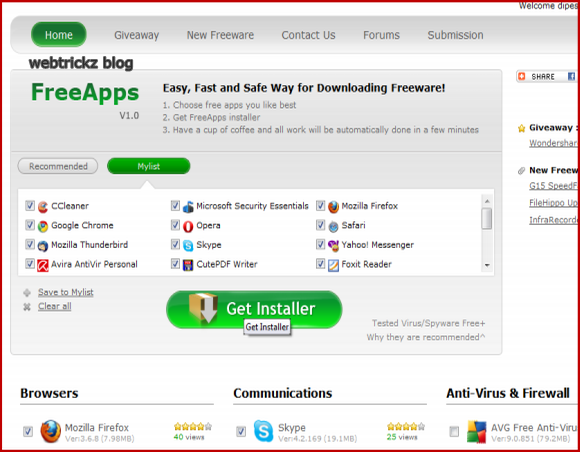
FreeApps: Download multiple Freeware on One Single Click

You might have installed many software programs, and do use them on regular basis for different purposes. But, the ultimate problem turns up when you Format your System, and you have to reinstall each and every application turn by turn going through identical sequence of steps.  You might get bored by such a repetitive task and may think why not employ a robot for such a monotonous task.

To save you from such a tedious task of going through installation wizards of all your different programs comes in the FreeApps.

FreeApps, is a multiple freeware installer website that lets you choose software applications for almost every category from a vast list and then it lets you download a single setup to install all your selected applications in one go. The best part is that everything is Free and you don’t have to go through any registrations.


It offers you a recommended list or you can make your own list by handpicking software application from different number of available categories. You are free to choose your favorite browser from Browsers category or your communication software from category communications. Once you are done with your software selection, you can download a small setup to launch the installation of all your programs.

The downloaded installer doesn’t contain the complete setup of all the applications that you selected. When the installer is run, it downloads the latest versions of all the freeware’s you selected and installs them automatically one by one without any human intervention.

The drawback comes in to picture when the installation fails if your internet connection is aborted in the midst of the installation. No doubt, this is a great service to save your precious time against searching for latest versions and going through repetitive installation steps. But, if you are still not satisfied and searching for a greater app store then you can give a try to similar service allmyapps.com.

Visit: FreeApps

Wednesday, September 8, 2010

SlimDrivers: Automated Device Driver Updates

Updating computer’s device drivers is very important to achieve optimum performance from them. Driver updates generally includes many bug fixes and incompatibility of the device to act with manysoftware applications, but for many users it becomes bit tedious work to find out drivers for each and every device manually on internet. There are many applications available that can automatically scan system devices and get appropriate updates for them but very few of them are free and provide us with accurate updates and additional functionality. SlimDrivers is a handy option in these situations.

SlimDrivers is a Microsoft certified windows freeware application that can automatically find device driver updates for your system. It is easy to use and also provide features like taking driver backup, restoring driver backups and creating system restore points.

Updates provided are categorized in two parts i.e Device driver updates and Windows updates. After it scans your system completely it displays a list of all updates available. You can select updates to be ignored and download other updates that will be downloaded and installed automatically.
Though SlimDrivers provides very accurate device drivers updates, it’s still in beta stage and there are many features that you may not like for instance, it will require a system restart every time an update is installed and there are no options to cancel the reboot momentarily.


Monday, September 6, 2010

JumpControl: Add Shutdown, Logoff, Restart and Sleep Button On Windows Taskbar

Every one loves to use shortcuts, they not only make our work easier but also saves lots of our precious time by terminating the need to search for applications each time. Using shortcuts brings these small frequently used applications or utilities at our finger tips. JumpControl is an application that helps to bringWindows power control to taskbar.

JumpControl is a freeware portable application for Windows that allows you to add Shutdown, Logoff,Restart, Sleep, Switch User and Lock windows options to taskbar. Working with this application is easy, only thing you have to do with this application is download it and pin it to your taskbar.

You can select the various power options that you want. After selecting the options you can avail the shortcuts just by right clicking on the JumpControl pinned application.


Wednesday, September 1, 2010

Cute Screen Recorder: Free Screen Recording Tool

If you remember recently we discussed about Wondershare DemoCreator which is a powerful screen recording tool. However a constraint there was that the utility was a paid software. Cute Screen Recorder is a similar screen recording utility and the best part is that it is completely free.
The Screen recorder can effortlessly captivate all happenings on your screen a compose a video in  mp4,flv,swf and wmv video formats. This freeware utility also comes with audio support. Thus you can easily add voice to the demonstraton that you are making.
With Cute Screen Recorder, you can not only go for capturing full screen videos, but also record anyselected area or application.  You can even set the region to capture by dragging the mouse to indicate the area.


The utility also comes with the option of editing the video quality. You can do this by controlling the video bit rate and frame rate.
Though this utility may not have as much options as Wondershare DemoCreator, but it is definitely worth giving a try. It has file size of just 4.06 MB and runs smoothly on all  Windows platform.

Monday, August 30, 2010

PhotoEdit : Portable Image Editing Tool

There are many tasks we perform daily which requires photo editing. Tasks like uploading photos to social networking sites like Facebook, Orkut, placing images in documents, blogging etc. Apart from Microsoftpaint application that comes by default in windows there are many applications like Photo Pos Pro that can provide even greater functionality and output image quality. PhotoEdit is another tool for image editing jobs.


PhotoEdit is a portable freeware tool that can be used for light editing jobs like photo resizing, resizing canvas, flipping images, adding effects like gaussian blur, sharpening images, image cropping etc. It provides lots of image adjustment options like adjusting brightness, hue, saturation, contrast etc.
In PhotoEdit you can open many image files and work easily by switching on them. It is very easy to use with simple and clear interface. It’s basic advantage is that it can be carried anywhere in portable devices for instant photo editing.


Friday, August 27, 2010

Watch4Folder: Monitor Folder Changes

With day to day computer usage,  we keep on adding and removing many files from folder. These files may be located in many folders. Monitoring these folders manually can be a tedious job when we talk about folders that consist of several sub folders. So, here is a folder changes monitoring software called asWatch4Folder that help windows user keeping track of files added or removed in any particular folder by other users hence keeping track of their folder change activities.

Meanwhile, Watch4Folder is a windows freeware portable application with a single window easy to use interface. After you have downloaded the the file only thing that has to be done is extracting it to get the executable file.


To get it work you have to add any folder that you want to monitor on your hard disk. It also provides option to monitor sub folders within the selected folder. Watch4Folder works by taking in event by the user and performing the selected option. You can select among several events such as file create, file rename, folder create, folder delete, free space change, media change, association change etc. There are options to set actions based on the occurrence of these events like writing log files and triggering other applications.

There is also a window for viewing live logs where you can view changes made to folders in real time monitoring. Watch4folder provides help pop-ups in all the options you have to work with. As it is a portable application it can be easily carried in portable drives and can be used easily on any system running windows.

Thursday, August 26, 2010

NetTraffic: Monitor and keep Track Internet Usage On Windows

Monitoring and keeping track internet usage is an important aspect for people usinginternet connections with limited bandwidth. With huge amount of data that we transfer daily either by browsing or downloading several files through internet normally makes it bit difficult to calculate the actual bandwidth usage. By default windows does not provide any appropriate methods to keep exact tract of the amount of data we are transferring. NetTraffic helps to solve this situation.


NetTraffic is a windows freeware application with an easy to use interface. Upon installation it resides in the system tray and you can view current real time upload and download status in a small window.


If you want to view traffic records for a particular date, week or month in detail then you have to right click on NetTraffic and go to statistics. Here you will get two options to view i.e general and charts/tables. In the general window you can view statistics in different modules like current state, average and prognosis. More details can obtained from charts/tables with specific searches of date and time. All these data can be saved in XML format for later reference.

NetTraffic measures network usage almost accurately and can be easily handled by beginners or home users with basic knowledge. It works with all versions of windows but there are some issues with windows 764 bit as reported by some users.

Download: NetTraffic

Tuesday, August 24, 2010

Get Facebook Updates on Desktop with FBQuick

Facebook has become immense popular these days even if it had some privacy issues.  If you want to receive Facebook updates without opening the website, then FBQuick can be nice option for you.  It is a free, easy to use, Facebook notifier that sends all the notifications right on your desktop.

The notifications include messages, pokes, wall, group invitations, event invitations, friend requests andtagged photos. However, you can update your profile using this software. It is just for those lethargic people who want to get the Facebook updates even without opening its home page.


The option field present in the utility allows you to set the time period after which you want to receive the updates. You can also start the application as soon as you login to the Windows.

FBQuick is a freeware having a file size of 8.9 MB and it works well on all Windows Platform including XP, Vista and Windows 7.

Free O&O UnErase 6 License Code Download

O&O UnErase, free data recovery software that restores all your deleted files on any windows drives. Thisdata recovery comes with Intelligent search algorithms are able to scan even the largest hard disks in almost no time at all. Even when part of your file has been overwritten, it’s possible that intact elements of it can still be recovered.


During searching for your lost data, O&O UnErase comes with special filter options allow you to avoid digging through long lists of files. These options allow you to search for deleted files according to their name, type, or size. If you’re not sure of the drive where the data was deleted, just scan through one drive after the other. When the scanning’s done, all the files and folders that have been found will be displayed. Now you’ll just have to indicate the ones you want to be restored.

O&O UnErase 6 Features List:

§  Recovery on network drives (Shares and UNC)

§  Improved search algorithms for texts within files; able to correctly recognize even non-Ansi texts

§  Windows 7 and Windows Server 2008 R2 compatible
§  Recovery of deleted files and folders

§  Supports all Windows-compatible drives and disks

§  Supports all Windows supported file systems (except exFAT)

§  User interface similar to Windows Explorer

§  No limit to the amount of files that can be recovered


At now, you have a chance to grab yourself a full O&O UnErase 6 license for free, which O&O is running a great promotion that gives away free license serial key of O&O UnErase 6. This data recovery software is worth $29.95 but now you can get absolutely free.

To get a free O&O UnErase 6 license, you can simply visit this free O&O UnErase 6 promotion page. Then just simply fill your name and email ID and submit the form. You’ll receive the free license code in your Inbox very soon.

O&O UnErase 6 is compatible with Windows 7, Server 2008 R2, Server 2008, Server 2003, XP, 2000 and Windows Vista platform (32-bit, 64-bit).

Monday, August 23, 2010

Xirrus Wi-Fi Inspector & efficient WiFi manager and troubleshooter

These days Wi-Fi networks have started becoming quite common. We see it in colleges, high schools, airports etc.  The de facto Wi-Fi (Windows by default) troubleshooting is not much of a help when it comes to troubleshooting Wi-Fi connections. Here comes the importance of a utility known as Xirrus Wi-Fi Inspector

The Wi-Fi inspector takes into consideration the performance of Wi-Fi connections. It continuously searches for the available Wi-Fi networks. It then manages and troubleshoots the Wi-Fi connections. Troubleshooting will involve verifying Wi-Fi coverage, locating Wi-Fi devices and detection of rogue APs (Rogue Access point).


The Wi-Fi inspector also comes with the option of exporting the settings of Wi-Fi network. Thus, if you see that the Wi-Fi is working well in your friend`s device and not on your device, you can just export the settings of Working Wi-Fi connection to your device. The freeware utility is of 19.19 MB and runs on all Windows platform including, XP, Vista and Windows 7 featuring laptops.